What is a Python program?
Python programs are sets of instructions that a computer can follow, written in a programming language called Python.
The Python programming language can be written on several file formats. The most common one is called a Python program file. This is a single plain text file ending with .py. You may also see them referred to as scripts or source code. Once a Python program file is written, the user can ask the computer to follow the instructions within. This is called running or executing the program.
To run a Python program, Python itself needs to be installed on your computer, enabling it to understand your instructions.
You can write Python programs in any plain text editor (e.g. Notepad or TextEdit), but it is helpful to use an editor that can write and run your code in one same place. These are called code editors, or if they have more features, they are called an Integrated Development Environment (IDE).
This lesson teaches you how to install Python and an IDE called Spyder.
Installation
Miniforge is a package which includes Python and conda. conda will allow us to
download an up-to-date version of Spyder and other Python-related software.
Go to the Miniforge website and download the installer corresponding to your operating system.
Run the installer and follow the default instructions.
Search for “Miniforge Prompt” in your programs and open it. (On MacOS, open a Terminal instead)
Paste
conda create -c conda-forge -n spyder-env spyder numpy scipy pandas matplotlib sympy cython plotlyin the prompt and press enter.
Step 4 will take enough time to make a cup of tea.
Testing your installation
To make sure that everything is in order, we will run our first Python program.
Open Spyder
Search your programs for Spyder (spyder-env) (maybe with a version number) and open it. It could take a minute. This will open window similar to this:
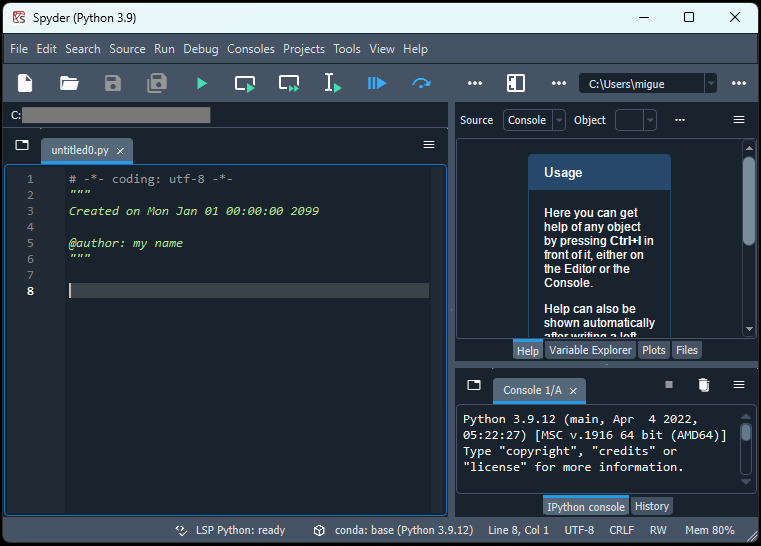
You may first see a pop-up suggesting to update Spyder. You can safely close it.
Write a Python program
The left-hand pane is where you can write your program. On line 8, paste the following text:
print("Hello, world!")It should look like this:
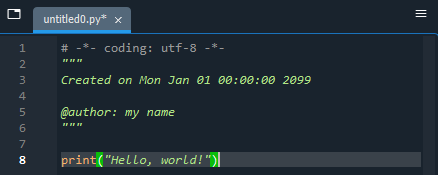
This one-line program tells the computer to repeat the words “Hello, world!” to us in writing.
Next, save the program by pressing the “Save” button in the top ribbon (Shortcut: Ctrl + S):

Run a Python program
To run the program, press the “Play” button in the top ribbon (Shortcut: F5):

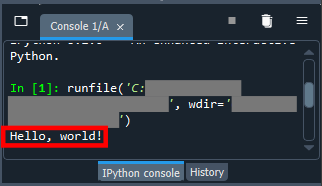
Anything that the computer writes as a result of the program is called an output. Read your output in the bottom-right pane:
Advice
You should now be in a position to write Python programs, or open pre-existing ones using File-> Open (Shortcut: Ctrl+O) on Spyder. There are many other Python code editors that work very similarly, such as PyCharm.
Some Python code does not come in Python program files. The most popular alternative is the Jupyter Notebook, which Spyder is unable to open.
Some complex programming projects might involve multiple .py files which make reference to each other. In such cases, you may need those several files saved in the same folder for the program to run.
It is also possible to run Python programs without opening their source code, but the way to do this depends heavily on the kind of program it is and the computer it is running on.
Summary
Python code is saved in
.pyfiles.You can write it and execute it in a code editor.
Python needs to be installed on a computer before running Python programs.